Your first 15 minutes
A short route through Vott: tell Iris about your work, agree a first task, review the result and try a call.
The free plan has one task and a few call minutes a month, so this route uses each of them once.
1. Tell Iris what you do
Open Chat. Iris, the executive assistant, is first in the list. Tell her about your business and what you need help with — two or three sentences are enough. She keeps notes and remembers it next time.
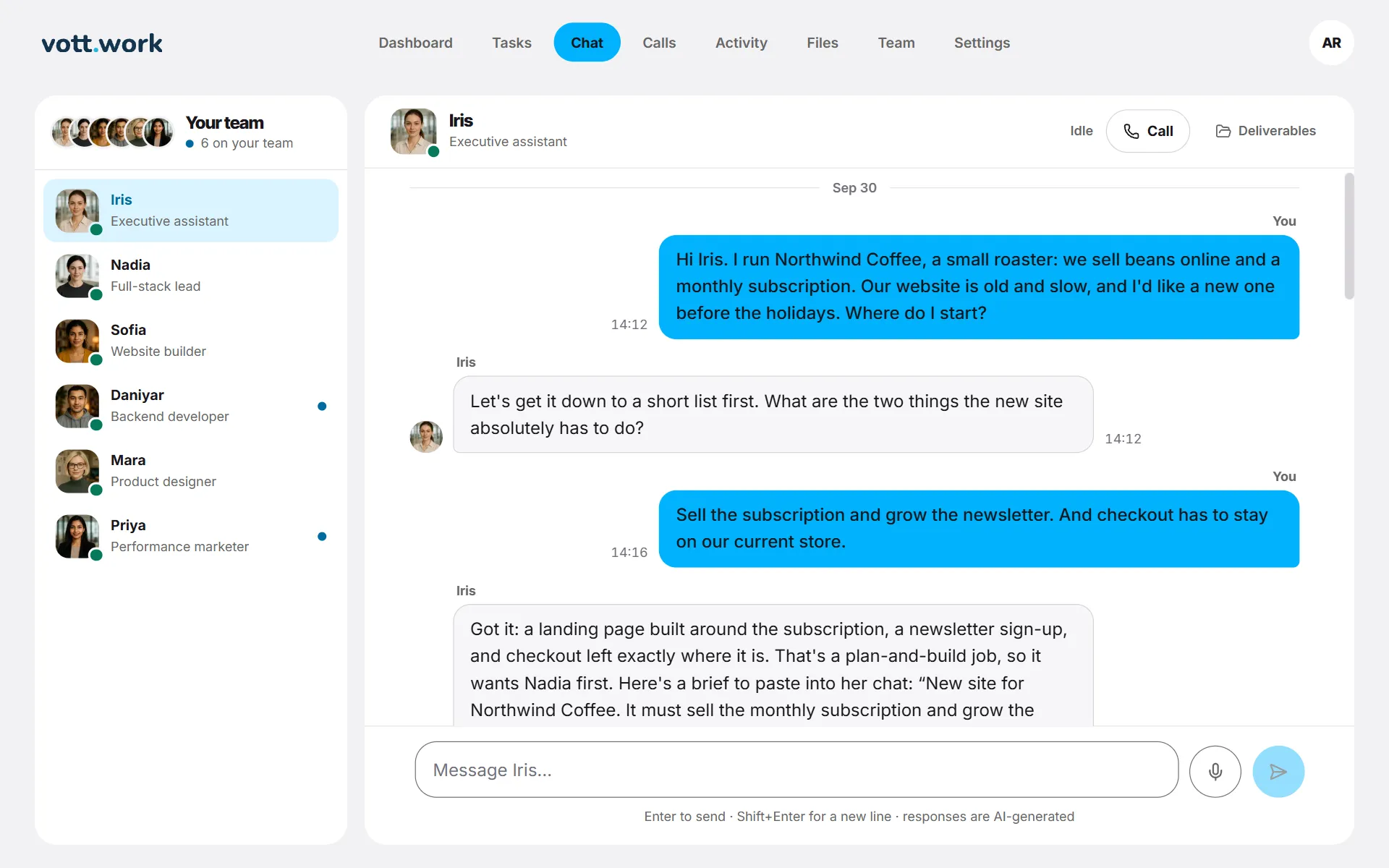
2. Agree a first task
Ask for something specific, for example “a one-page site for our coffee subscription with five sections”. If it is a job for a specialist, Iris names who should take it and writes a brief for you to paste into that person's chat. The employee sums the brief up in one line; once you agree, the task appears on Tasks as In progress.
3. Review the result
When it is ready, Activity shows Ready for your review and the task says Needs you. Open it with Details, then press Accept or Request changes. Every task includes 3 rounds of changes at no extra cost.
4. Try a call
Open Calls, choose Voice to keep your video minutes, and press Go live. When the seat says On air, unmute your microphone and talk. Calls are in English.
5. Find your files
Everything your team has handed back is in Files, in a folder for each employee.
Screenshots show a sample workspace, Northwind Coffee.
Still stuck?
Write to us and say what you were trying to do, what you expected and what happened instead. A screenshot helps.