Find your way around
The bar at the top leads to every screen. The round button with your initials opens your account menu.
| Screen | What it is for |
|---|---|
| Dashboard | Your day at a glance: Iris's briefing, tasks this week, minutes left and your team. See The Dashboard, tile by tile. |
| Tasks | Every task with its status and its result. Accept work or ask for changes here. |
| Chat | A conversation with each employee. |
| Calls | The call room: choose who joins and whether it is video or voice, then press Go live. |
| Activity | Updates from your team: work ready for review, tasks that couldn't finish, call summaries. |
| Files | Everything your team has handed back, in a folder for each employee. |
| Team | The six employees, what each one does, with buttons to chat or call. |
| Settings | Your profile, your plan and usage, password and sign-out. |
The account menu
Press your initials at the top right. The menu shows your name and email, the language switch, your plan and how many tasks are left, and the items Settings, Help & support, Dark theme (or Light theme) and Sign out.
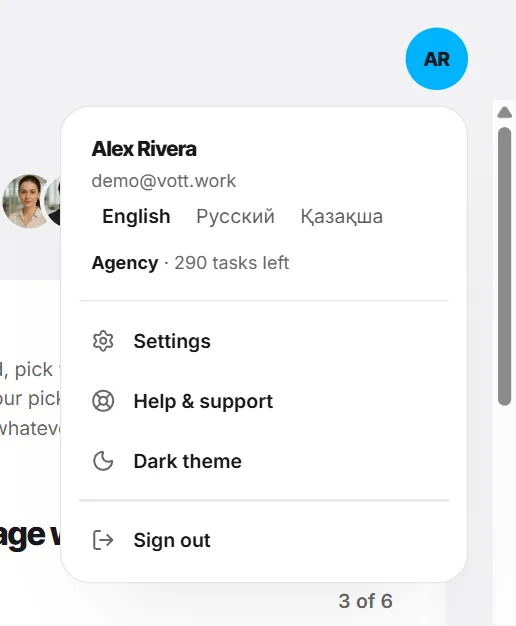
Screenshots show a sample workspace, Northwind Coffee.
Still stuck?
Write to us and say what you were trying to do, what you expected and what happened instead. A screenshot helps.