Content plan for a month: four weeks of posts in one sitting
Pick three or four content pillars, set a cadence you can keep, fill a four-week calendar, reuse each idea and measure what worked. A plan template is included.
You can plan a month of social posts in one sitting if you settle three things first: what you post about, how often, and what each post should get people to do. Below: how to choose pillars, a cadence you can keep, a four-week calendar for a neighbourhood bakery and a plan template to copy.
Start with one goal and three or four pillars
A content plan is a list of posts, each with a reason. The reason is a goal you can see in your own numbers: more weekend pre-orders, more bookings for weekday mornings, more people messaging to ask about catering. Pick one goal a month. Then every post has a job — some lead straight to the goal, and the rest earn the attention those posts need.
Write the goal and the one action at the top of the plan: “Goal: more birthday-cake pre-orders in November, counted from the order book. Action: send us a message to order.” If a post idea serves neither the goal nor the audience, it waits for another month.
Pick three or four content pillars
A pillar is a topic you come back to every week. Three or four give you variety without starting from zero each time. A good set mixes posts that sell with posts that are simply useful or interesting, so the account isn't one long advert.
For a neighbourhood bakery, a working set could be:
- The counter — what is baked today, prices, new items, pre-orders. This pillar sells.
- Behind the scenes — the 5 a.m. dough, the oven, the people. This one builds trust.
- Useful — keeping bread fresh, which loaf suits which dish, how far ahead to order a cake.
- The neighbourhood — regulars (with their permission), the Saturday market, the school fair you bake for.
Test each pillar with one question: could you make four posts on it without straining? If not, it is a single post, not a pillar.
A cadence you can keep
The right cadence is the one you are still keeping in week four. Choose by the time you actually have, not by how often other accounts post.
| Cadence | Posts in four weeks | Fits when |
|---|---|---|
| 2 a week | 8 | You do everything yourself and photos take time |
| 3 a week | 12 | You can shoot a week's photos in one go |
| 5 a week | 20 | Someone on the team posts as part of their job |
Stories, quick polls and replies to comments sit on top of the plan; they don't need planning a month ahead. Plan the posts that take preparation: the photos, the carousels, the captions that need thought.
The calendar: four weeks on one page
Here is a month for the bakery at three posts a week, aimed at the cake pre-order goal. Each cell holds a pillar, a format and an idea in one line.
| Week | Monday | Wednesday | Friday |
|---|---|---|---|
| 1 | Counter · carousel: this month's four cakes with prices | Behind the scenes · short video: decorating a cake | Useful · photo and caption: how far ahead to order |
| 2 | Counter · photo: the week's new loaf | Neighbourhood · photo: the Saturday market stall | Counter · carousel: cake sizes and how many each serves |
| 3 | Useful · carousel: keeping bread fresh for three days | Behind the scenes · short video: 5 a.m. at the oven | Counter · short video: a customer collecting a cake (with permission) |
| 4 | Neighbourhood · photo: a regular's favourite order | Useful · text post: the five most-asked cake questions | Counter · photo: last weekend to pre-order this month |
Notice the rhythm: the selling posts land on Mondays and Fridays, when people plan their week and their weekend. That is a guess to test, not a rule; your own numbers will show which days work for you.
Match the idea to the format
- Carousel — anything with steps, options or a list: menus, sizes, “how to”.
- Short video — anything that moves or changes: a process, before and after, a reveal.
- Single photo — one product, one place, one face.
- Text post — answers to questions, announcements, a story with a point.
- Stories and polls — quick questions, reminders, the last call before a deadline.
If an idea doesn't fit any format easily, it is often two ideas. Split it.
Posting in more than one place doesn't mean planning twice. Plan each post once and adapt it when you prepare it: a carousel can become one photo with a longer caption, and the best line of a video can become a short text post. Keep the action the same everywhere.
One idea, used four ways
Planning gets easier when one good idea feeds several posts. Take “how many people does each cake size feed?”:
- A carousel with each size, its price and how many it serves.
- A short video of a cake being cut into portions.
- A story poll: “What size did you need last time?”
- One of the answers in the week 4 post of most-asked questions.
Each version ends with the same action — message us to order — so the month repeats one request instead of making ten different ones.
Measure what worked, then plan the next month
Before the month starts, pick one or two numbers tied to the goal and write them into the plan. Likes are easy to count, but they rarely tell you whether a post moved the goal.
- Messages and calls that mention a post.
- Pre-orders or bookings this month, against last month.
- Saves and shares of the useful posts — a sign people want to come back to them.
- Link clicks, if a post points somewhere.
- Answers to “where did you hear about us?” at the counter.
At the end of the month, spend twenty minutes on three lists: keep (posts that moved the goal), change (a good idea in the wrong format or on the wrong day) and drop (nothing happened, twice). Next month's plan starts from those lists. If the posts point to a page, Landing page in a day covers what that page needs.
The plan template
Month: ___
Goal for the month (one number I can check): ___
The one action the posts ask for: ___
Who the posts are for: ___
Platforms: ___
Cadence: ___ posts a week, on ___ (days)
Pillar 1 (sells): ___
Pillar 2 (behind the scenes): ___
Pillar 3 (useful): ___
Pillar 4 (optional): ___
Week 1: day — pillar — format — idea — action
Week 2: day — pillar — format — idea — action
Week 3: day — pillar — format — idea — action
Week 4: day — pillar — format — idea — action
Ideas to reuse in another format: ___
Numbers to check at the end of the month: ___
Review: keep ___ / change ___ / drop ___
Planning the month with Priya in Vott
Priya, Vott's marketer, is an AI agent, not a person. In chat she can help you work out pillars and ideas, and she can write the finished plan as a task. She can't post, schedule posts on your accounts or see your statistics: employees can't reach your systems or browse the internet, and they can't make images or video (What employees can and can't do). The photos, the posting and the numbers stay with you. More on this in What to delegate to an AI assistant.
- Open Chat and pick Priya. Tell her what the business is, who your customers are, the goal for the month and how many posts a week you can really manage.
- Work out the pillars and ideas together in chat. Chat messages don't count against your plan (What counts against your plan), so ask for twenty ideas, throw out fifteen and ask again. Paste last month's numbers if you want them taken into account — she sees only what you write.
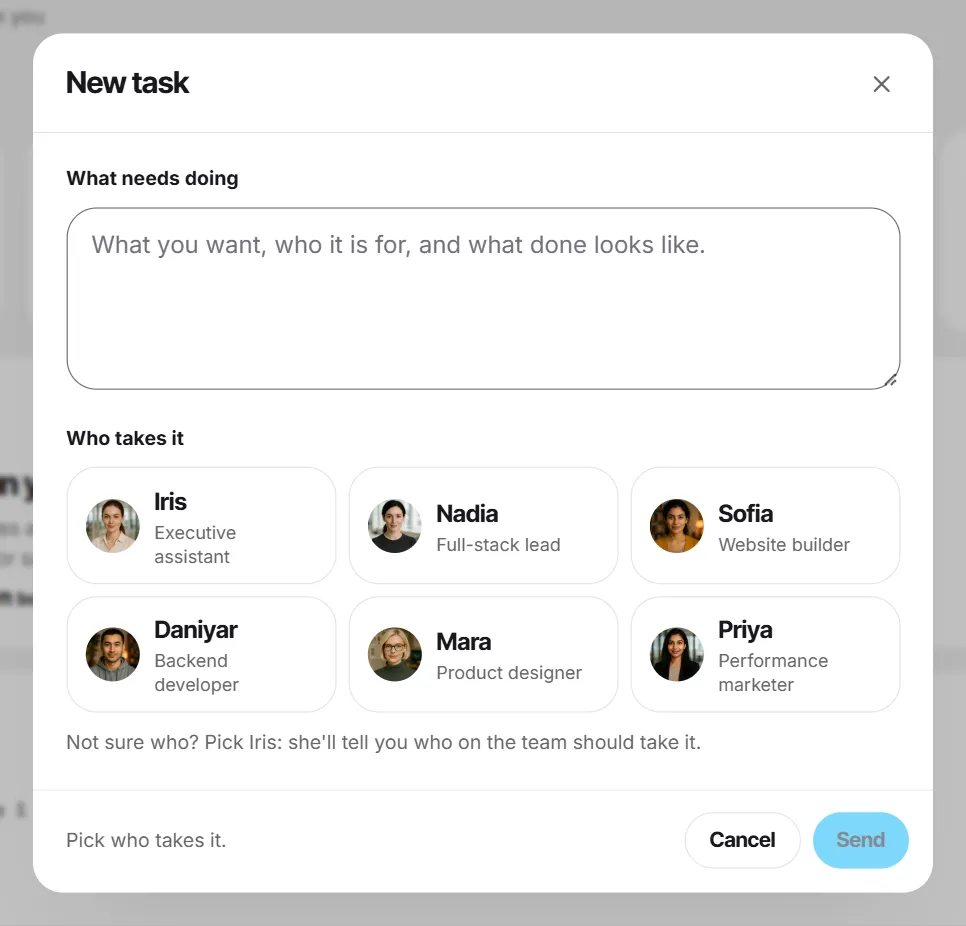
- When the pillars and cadence are settled, ask for the finished plan as a task: the month, the platforms, the cadence, the calendar week by week and a draft caption for each post. Or press New task and choose Priya under Who takes it. She sums the brief up in one line; if it is right, say so. The task appears on Tasks as In progress (Give your team a task).
- When Activity shows Ready for your review, open the task and press Details. The plan is a document with Copy and Download.
- Press Accept, or Request changes and say what to change. Every task includes 3 rounds of changes (Review the work).
- At the end of the month, bring the numbers back to the same chat and plan the next one. Priya keeps short notes about you between conversations (What employees remember about you).
Try it with your own task
The free plan includes one real task, 5 voice minutes and 2 video minutes. No card needed.
Vott is software: every employee is an AI agent, not a person or a freelancer.
Read next
Landing page in a day: sections, copy and a checklist
The six sections a small-business landing page needs, why the copy comes before the design, a worked example for a dental clinic and a checklist to copy.
What to delegate to an AI assistant, and what to keep
A simple rule for sorting your work: what an AI assistant handles well, what should stay with you, how to check its output, and where Vott's AI employees fit.
How to write a brief that gets it right the first time
The five parts every brief needs, three before-and-after examples, a template to copy, and how to brief a freelancer, an agency or an AI employee.